Groundskeeper brings your school IT estate—connectors for the systems you already run, local AI, instant alerts—into a single dashboard. Your data never leaves your network.
To be told when it is out, watch the GitHub repository (Watch, then Custom, then Releases). GitHub sends the notice; we keep no mailing list.
[INFO] Firing up the tractor...
[INFO] Connector registry loaded
[OK] Ollama reachable — llama3.1:8b
[OK] Scheduler started — all connectors active
[OK] HTTPS listening — port 8443
[INFO] Dashboard at https://localhost:8443
[READY] Groundskeeper is watching the grounds
See it
Real pages from a real installation, filled with an invented school's data. Every screen below is the product as it ships, not a mock-up.
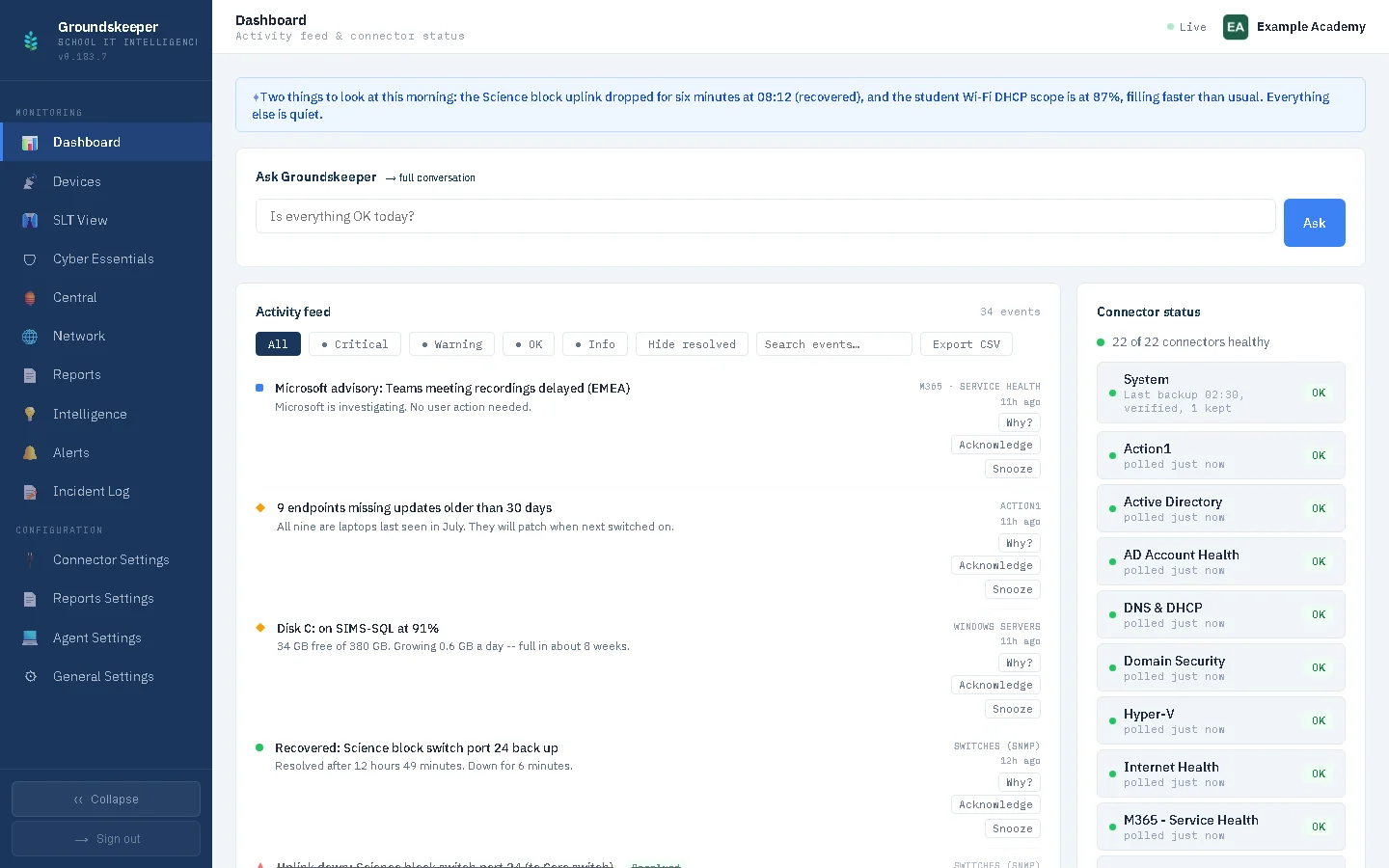
The activity feed: every issue with its age, a plain-English AI summary at the top, and the connector status down the side. Silence means everything is fine.
Core pillars
A chronological, deduplicated event stream across all your connectors. Criticals surface immediately with instant email or Teams alerts. OK events suppressed for 60 minutes so you see what matters, not what's chattering.
Runs entirely on your server via Ollama. No data leaves your network. Hit “Why?” on any alert for a plain-English explanation. Summaries auto-generated every 5 minutes. Also works via Azure OpenAI, Anthropic Claude, Google Gemini, or OpenAI.
A read-only traffic-light dashboard for Senior Leadership Teams. No jargon, no noise—just red/amber/green for each service area. Instant load, no AI dependency. Safe to share with a headteacher.
Critical events trigger immediate email alerts with quiet hours support so you're not paged at 2am for a non-issue. Teams and Slack webhooks also supported for channel notifications.
One dashboard aggregating traffic-light status across every school in a group—MATs, local authorities, dioceses, federations, independent school groups. Each school keeps its own self-hosted instance; no central cloud dependency.
Maps all five Cyber Essentials technical controls to live data from your connectors. RAG status per control. Built-in evidence trail for CE assessments. No extra tooling required.
Connector ecosystem
Read-only connectors that never modify your systems. GDPR-friendly—data stays on your network.
RSJ Agent
The RSJ Agent is a single, lightweight native Windows agent, deployed to your machines via Group Policy and built to be modular: Groundskeeper runs as a module on it today, and future RSJ tools slot into the same agent — nothing new to deploy. It checks in regularly, reporting endpoint health back to your dashboard. No WinRM, no third-party framework — just an installer and a GPO.
GPO deployment
Windows installer
The Groundskeeper Windows installer bundles everything—Python runtime, all dependencies, the service wrapper. Run the wizard, click Next three times, and your school estate is being monitored. Upgrade in place or uninstall cleanly from Add/Remove Programs.
You'll need: Windows Server 2022 with 16 GB RAM (8 GB works, but 16 GB runs the local AI models far more comfortably).
What to expect: Windows SmartScreen may show "Windows protected your PC" the first time you run the installer (click "More info" → "Run anyway") since it isn't yet from a code-signed publisher, and your browser will show a certificate warning on first opening the dashboard, since it uses a self-signed certificate for HTTPS — both expected for a self-hosted tool on your own network. Each release also lists a SHA-256 checksum for both installers.
Groundskeeper setup
Project roadmap
FastAPI backend, APScheduler, SQLite, pluggable AI (Ollama, Azure, Anthropic, Gemini, OpenAI), full settings UI, first-run setup wizard, SLT traffic-light view, Windows service. Connectors covering cloud services, infrastructure, security, hardware, AD hygiene, and school-specific monitoring.
The native RSJ Agent, with Groundskeeper's collectors built in as a module. Deployed via Group Policy as a hardened Windows service. Reports BitLocker, Defender, firewall, local admins, Windows Update compliance, SMART disk health, BSOD events, battery health, and exam marking software detection.
Immediate critical alerts with quiet hours. Teams/Slack webhooks. Cyber Essentials compliance dashboard. Groundskeeper Central multi-school hub-and-spoke view. Licence key system with three editions (Ed25519 offline verification + Cloudflare call-home). Windows installer with in-place upgrades.
A security review with every critical finding fixed. PowerShell injection eliminated codebase-wide via safe execution helper. Agent auto-update hardened with HTTPS enforcement, host pinning, SHA-256 verification, and Authenticode checking. HTTPS by default on port 8443 with auto-generated self-signed certificate.
Edugeek community launch, in time for the autumn school budget cycle.
Jamf School MDM, Entra Connect heartbeat, Smoothwall / Lightspeed filtering appliances, InVentry / Sign In App, PaperCut MF, Paxton door access, Synology / QNAP NAS, hardware warranty lookup.
Pricing
Community Edition is free. Pro unlocks everything for one school, priced to your phase. Central adds a single aggregator dashboard across a whole group—MATs, local authorities, dioceses, federations, independent school groups.
A group runs Central on one hub (£100/yr) with each of its schools on its own Pro licence — £100/yr for a primary phase school, £250/yr for a secondary (or other) phase school. UK schools and trusts can purchase by PO. How Groundskeeper compares.
Support is by email for the paid editions and GitHub issues for everyone, answered by the person who wrote the software. Bugs get fixed. What there isn't is a helpdesk with opening hours, or someone to do the install for you: Groundskeeper is built to be installed and run by the school's own IT.
Community
Suggest and upvote the connectors and features you want most — no sign-in needed. Your school’s priorities drive the roadmap.
Running Smoothwall? PaperCut? Paxton? Tell us which system you’d most like Groundskeeper to monitor. Vote on suggestions from other schools to push the most-wanted connectors up the build queue.
Got an idea for the dashboard, alerts, AI, or reporting? Submit it here and let the community vote. The highest-voted requests feed directly into the next release planning cycle.
No sign-in required — suggest and vote in seconds.
Questions
Yes. Groundskeeper installs on one Windows server inside the school and needs no cloud service to run, so your monitoring data stays on your own network. It is priced per school, not per device or sensor, and comes with the views a school needs: Cyber Essentials and DfE filtering-and-monitoring readiness, a senior-leadership page and connectors for the systems schools actually run. How it compares with other monitoring tools.
A connector is how Groundskeeper reads one system you already run. You give it read-only access, and it reports that system's problems into one plain-English feed. There are connectors for Meraki, Microsoft 365, Veeam, Action1, Active Directory, Windows servers, Hyper-V, switches, UPSes, printers, firewalls and more: the full list is on the wiki. Missing one you rely on? Suggest it, and vote for the ones you want: that list decides what gets built next.
Your monitoring data does not: it stays in a database on your own server. Once a day Groundskeeper checks its licence with us, sending the school's identity from the public DfE register, an anonymous install number, the version and how many connectors are switched on, and nothing else. The AI summaries run on your server by default; a cloud AI provider is only used if you choose one, and addresses, account names and similar identifiers are stripped out first, as far as they can be recognised.
No. It only reads. Every connector uses read-only access, and nothing in Groundskeeper can restart a service, change a setting or install anything on the systems it watches.
No. The connectors work without one, so you can start with no agents at all. The free RSJ Agent adds detail from each Windows PC and server, such as disk health, BitLocker, Defender and pending reboots, and goes on by one script, a Group Policy or straight from the console.
Windows Server 2019 or later (we build and test on Windows Server 2022), or Windows 10 or 11 for trying it out, with 16 GB of RAM (8 GB works; the extra helps the local AI). There is one installer. In our own installs it takes about an hour from download to the first connectors reporting and the first agents deployed.
Community Edition is free, with five connectors of your choice. Pro is £100 a year for a primary school and £250 a year for a secondary (or other) phase school, with every connector. Central, for a trust or group, is £100 a year for the hub, with each school on its own Pro licence. UK schools and trusts can pay by purchase order.
Yes, with Central. Each school keeps its own Groundskeeper server and its own data; the trust's hub gathers the picture from every school into one estate view, worst first, without a cloud layer in between.
The person who wrote it. Paid editions get support by email, and everyone can raise an issue on GitHub. There is no helpdesk with opening hours: Groundskeeper is built to be installed and run by the school's own IT.
Groundskeeper runs on Windows Server 2022 with Python 3.12. The first release is coming soon; the docs are there to read now.
To be told when it is out, watch the GitHub repository (Watch, then Custom, then Releases). GitHub sends the notice; we keep no mailing list.